
BEM
CSS 네이밍 컨벤션인 BEM을 알아보도록 하자.
BEM이란?
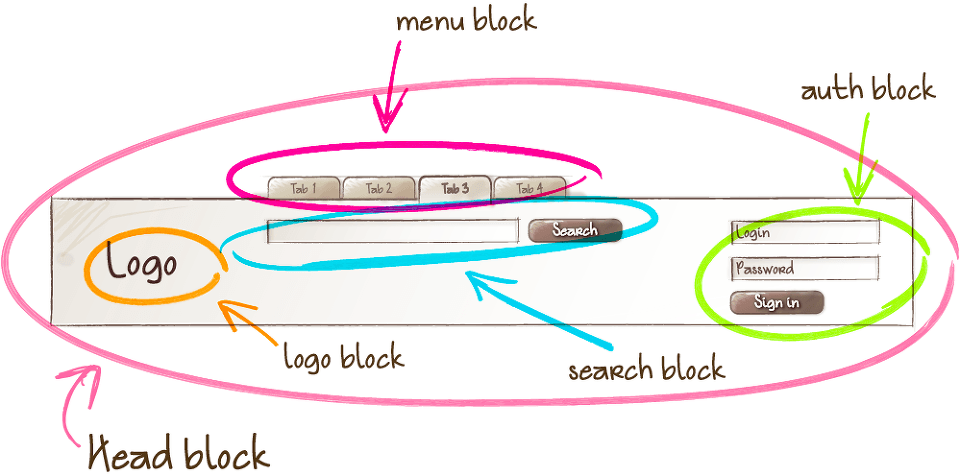
BEM(Block, Elements and Modifiers)은 CSS 네이밍 컨벤션의 일종으로, 그 규칙이 간단해서 협업에 편의를 더해주고 CSS 명시도(Specificity)에서 비롯되는 Selector의 복잡성을 줄여준다.
Block은 그 자체로 의미를 갖는 요소를 말한다(standalone entity that is meaningful on its own).
Element는 Block과 유사한 기능을 수행하면서도 Element 독립적으로는 의미를 갖지 못하는 요소를 말한다. 즉, Element는 Block에 의존적이다. (A part of a block that has no standalone meaning and is semantically tied to its block)
마지막으로 Modifier는 Block이나 Element의 flag다. Modifier는 Block이나 Element의 외관이나 행동을 변경할 때 쓰인다.
BEM은 기본적으로 Block__Element--Modifer, 즉 tab__item--focused(boolean)와 같은 형태로 쓰인다. form__login--theme-normal(key-value)와 같이 'Modifier-value' 형태로도 사용된다.
- BEM에 (HTML) ID Attribute는 사용되지 않는다. Class만 사용한다.
- 어떻게 보이는가(x) 어떤 목적인가(o) 화면에 빨간색 에러 메시지를 띄우고 싶다면, .red가 아닌 .error라는 명칭을 부여해야 한다. 추후 에러 메시지의 색상을 빨강이 아닌 다른 색으로 변경할 수 있기 때문이다.
BEM의 핵심이라고 생각되는 부분 또는 헷갈릴 수 있는 5가지 상황을 아래와 같이 정리했다.
코드로 살펴보는 BEM
case 1)
// Bad case
// .header .nav와 같이 .nav가 .header에 종속된다.
<div class='header'>
  <div class='nav'> </div>
</div><div class='header'> // Block
<div class='header__nav'> </div> // Block__Element
</div>case 2)
// Bad case
<form class='search-form'> // Block
  <div class='search-form__content'> // Block__Element1
    <input class='search-form__content__input'> // Block__Element1__Element2
    <button class='search-form__content__button'> // Block__Element1__Element3
// BEM은 구조의 깊이를 전달하지 않는다.
// DOM 구조적으론 Element2,3이 Element1 하위에 위치하지만,
// BEM 측면에선 그저 또 하나의 Block__Element다.
// Block__Element__Element와 같이 꼬아선 안 된다.
<form class='search-form'>
<div class='search-form__content'> // Block__Element1
<input class='search-form__input'> // Block__Element2
<button class='search-form__button'> // Block__Element3case 3)
// Bad case
<figure class='photo'>
  <img>
  <figcaption>
// BEM은 클래스명을 생략해선 안 된다.
// 클래스명을 생략하면 지금 당장은 간결해 보이고 좋으나,
// 명시도가 증가해서 위험함.
// .photo figcaption < .photo__caption
<figure class='photo'>
<img class='photo__img'>
<figcaption class='photo__caption'>case 4)
// Bad case
<button class='btn--submit'>
// btn에 변형이 있을 경우 --Modifier를 사용한다
// 이때 Modifier는 btn을 대체하기 위함이 아닌 확장하는 용도다.
// 따라서 btn--submit을 단독으로 사용해선 안 된다.
<button class='btn btn--submit'>case 5)
// BEM은 kebab-case, camelCase를 허용한다
<div class='some-thesis some-thesis--fast-read'> // Block, Block--Modifier
<div class='someThesis someThesis--fastRead'>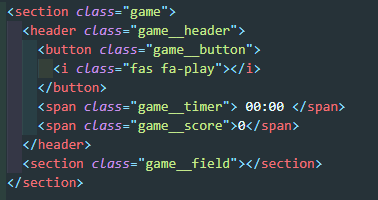
토이 프로젝트에 BEM을 적용해본 모습. game 블록내에 여러가지 Element로 구성된 것을 볼 수 있다. <i>태그에도 game__icon과 같은 구조를 적용해야 맞는지는 잘 모르겠다.