
프로젝트에 Sass 적용하기 (+문법)
Sass는 CSS 전처리기(preprocessor)로 CSS 사용에 편의를 돕는다. CSS 전처리기는 전처리기 자신만의 특별한 문법을 갖고, 추후에 css로 변환(생성)해서 사용하는 도구를 뜻한다.
“Prepro-what?" Think of CSS Preprocessors as programs that help you generate CSS using a unique syntax.
Sass의 종류로는 Ruby Sass, LibSass(node-sass), Dart Sass가 있는데, 현재는 Dart Sass만 공식적으로 update되고 있는 것 같다.
npm i -g sass로 sass를 설치하여 사용한다.
Sass를 CSS로 컴파일하기
사용법 1. css로 변환해서 사용하기
command line에서 sass (.scss file path) (.css file path) 명령어를 이용해서 작성한 scss 파일을 css파일로 컴파일하고, 컴파일 된 css파일을 HTML 파일에서 <link>해 사용한다.
--watch flag를 이용해서 좀 더 간편하게 이용할 수 있다. 이는 소스코드에 변화가 생긴 sass 파일을 추적하여 자동으로 css 파일로 컴파일해 줄 것이다. sass --watch (.scss file path) (.css file path)와 같이 입력하면 .scss파일이 변경될 때마다 자동으로 컴파일하여 css 파일을 만들어낸다. 파일 단위가 아닌 폴더 단위를 감시하려면 sass --watch (.scss folder path):(.css folder path)와 같이 입력한다.
vs code의 Liver Server + Sass --watch flag를 활용하면 편리하다.
사용법 2. bundler로 css 변환 및 빌드 과정을 자동화하기
모듈 = 분리된 코드의 조각. 시스템을 이루는 논리적인 일부분.
모듈 번들러 = 여러 모듈을 모아 번들링해서 하나의 파일로 단일화.
모듈 번들러의 종류로는 웹팩, parcel 등이 있다.
npm i parcel
npx parcel index.html
parcel-bundler 는 구버전(parcel 1.x)이다!
Sass 문법
Variables
Sass에서 변수는 $을 붙여서 선언한다. Sass 변수에는 style rule, at-rule,
!default flag를 통해서 해당 변수가 초기화되지 않았거나 null로 초기화되어 있을 경우에만 값을 할당할 수 있다. 해당 변수가 이미 다른 값으로 초기화되어 있다면, 할당문을 무시하고 그 값을 사용할 것이다.
Sass에서 $-와 같은 형태로 시작하는 변수는 private 변수다.
Nesting
Partials
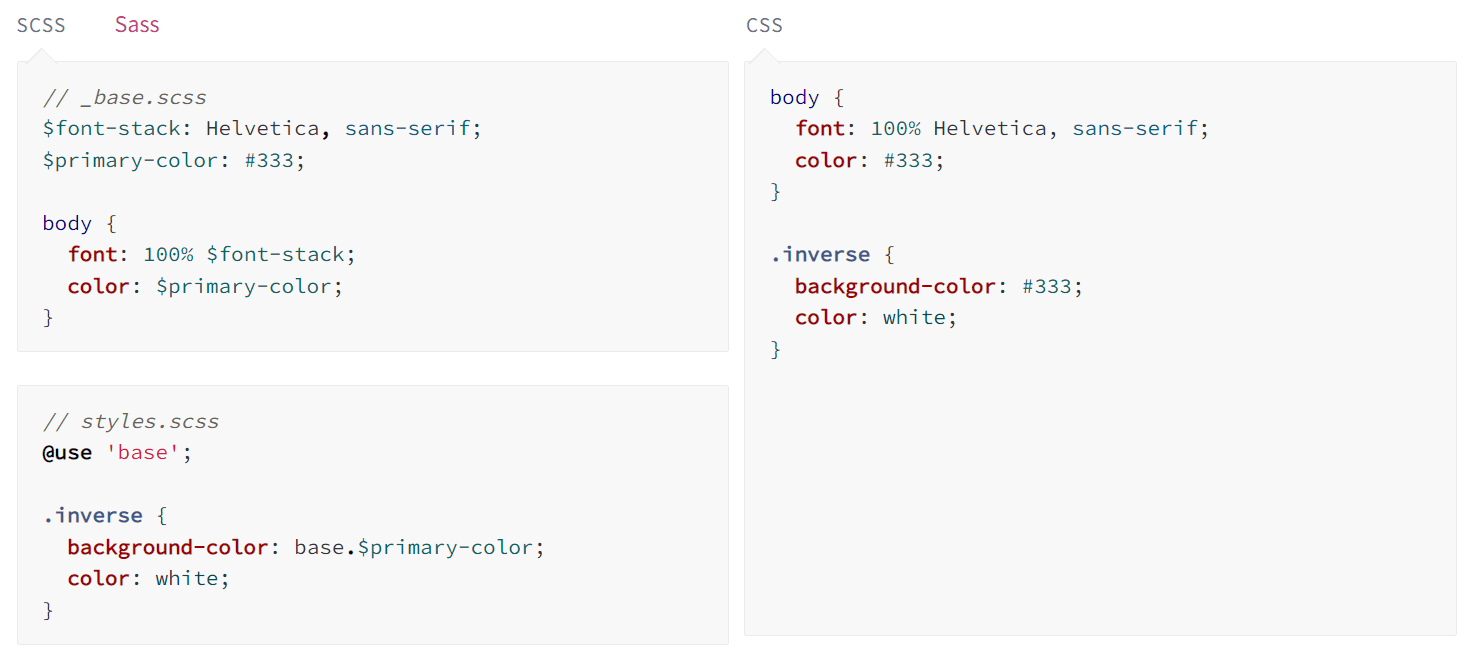
Sass 파일을 여러 개의 파일로 쪼개서 모듈화하기. 파일명 앞에 _표시를 하여 partial 파일임을 알린다. _표시는 Sass로 하여금 이 파일이 css로 컴파일할 대상이 아닌, 다른 scss 파일의 partial 파일임을 상기시킨다. partials는 @use 규칙과 함께 사용된다.
Modules
@use 규칙을 이용하면 하나의 Sass 파일에 모든 코드를 작성할 필요가 없다. 이 룰은 다른 Sass 파일을 module로써 load한다. 불러온 파일은 파일명을 기반으로 한 네임스페이스의 변수,믹스인,함수를 포함한다.
@use 규칙은 다른 Sass stylesheets로부터 mixins, functions, variables를 가져오는 규칙이다. 이렇게 다른 styleshhet로부터 가져온 것들을 'modules'라고 부른다.
@use로 불러온 modules는 (namespace).(variable)과 같이 namespace를 붙인 형태로 사용할 수 있다. @use (fileurl) as (namespace or *)과 같은 형태로 불러올 때 namespace를 짧게 지정할 수도 있고, *은 namespace 없이 로드하겠다는 의미다. 즉, namespace를 생략하고 (variable)로 modules를 바로 사용할 수 있다.
@use + @forward
@forward는 @use의 반복적인 사용을 줄여 편리하게 해준다. @forward는 @use 규칙을 사용하여 load된 stylesheets의 members를 public하게 드러낸다.
7-1패턴에서 7개 폴더에 각각의 _index.scss 파일(entrypoint file)을 만들고 이 index 파일에서 해당 폴더의 모든 모듈들을 @forward해 두면, 다른 폴더의 모듈에서 특정 폴더의 모듈을 참조할 때 해당 폴더의 모든 모듈을 @use하는 게 아니라 인덱스 파일만 @use해서 간편하게 사용할 수 있다.
Stop using @import with Sass | @use and @forward explained
@use vs @import
Sass는 CSS의 @import 문법과 유사하지만 독자적인 @import 문법을 갖고 있다. 하지만 Sass는 Sass-@import마저 사용을 지양하는 추세다. @import는 모든 variables, mixins, functions에 global scope를 형성하여 naming collision이 발생할 여지를 주고, @use에 비하면 컴파일 시간도 길다.
Sass는 @import의 좋은 대안인 @use를 권장한다. @use는 namespace.$변수명 문법을 통해서 naming collision 문제를 방지하기도 한다.
Mixins
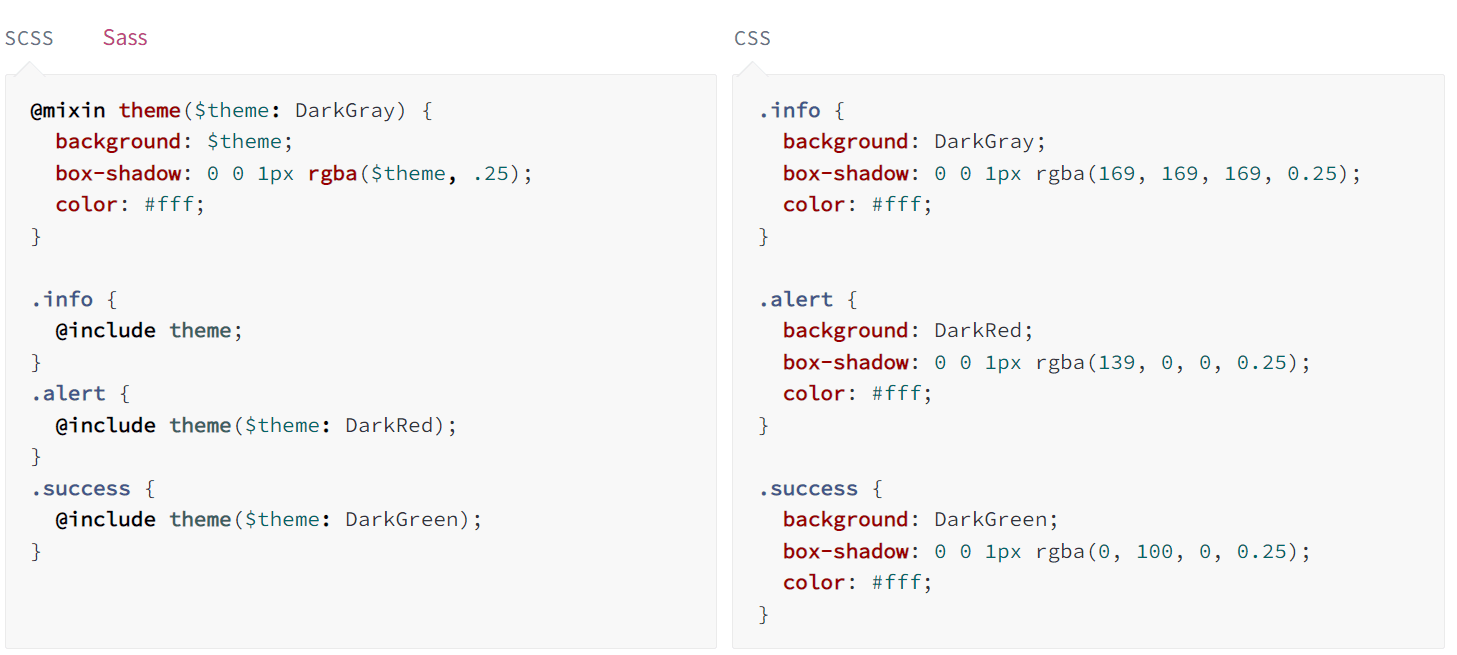
mixin은 일종의 CSS 선언 그룹이다. 이 그룹으로 코드를 재활용 할 수 있다. mixin에는 값을 전달하여 함수처럼 활용할 수 있다.
mixin은 다음과 같이 정의한다. @mixin 이름(매개변수)
정의한 mixin은 @include 이름(매개변수)과 같은 형태로 사용한다.
Extend/Inheritance
이 둘은 코드 재사용의 목적으로 혼용되어 쓰이고 있지만, 구분해서 사용할 필요가 있다.
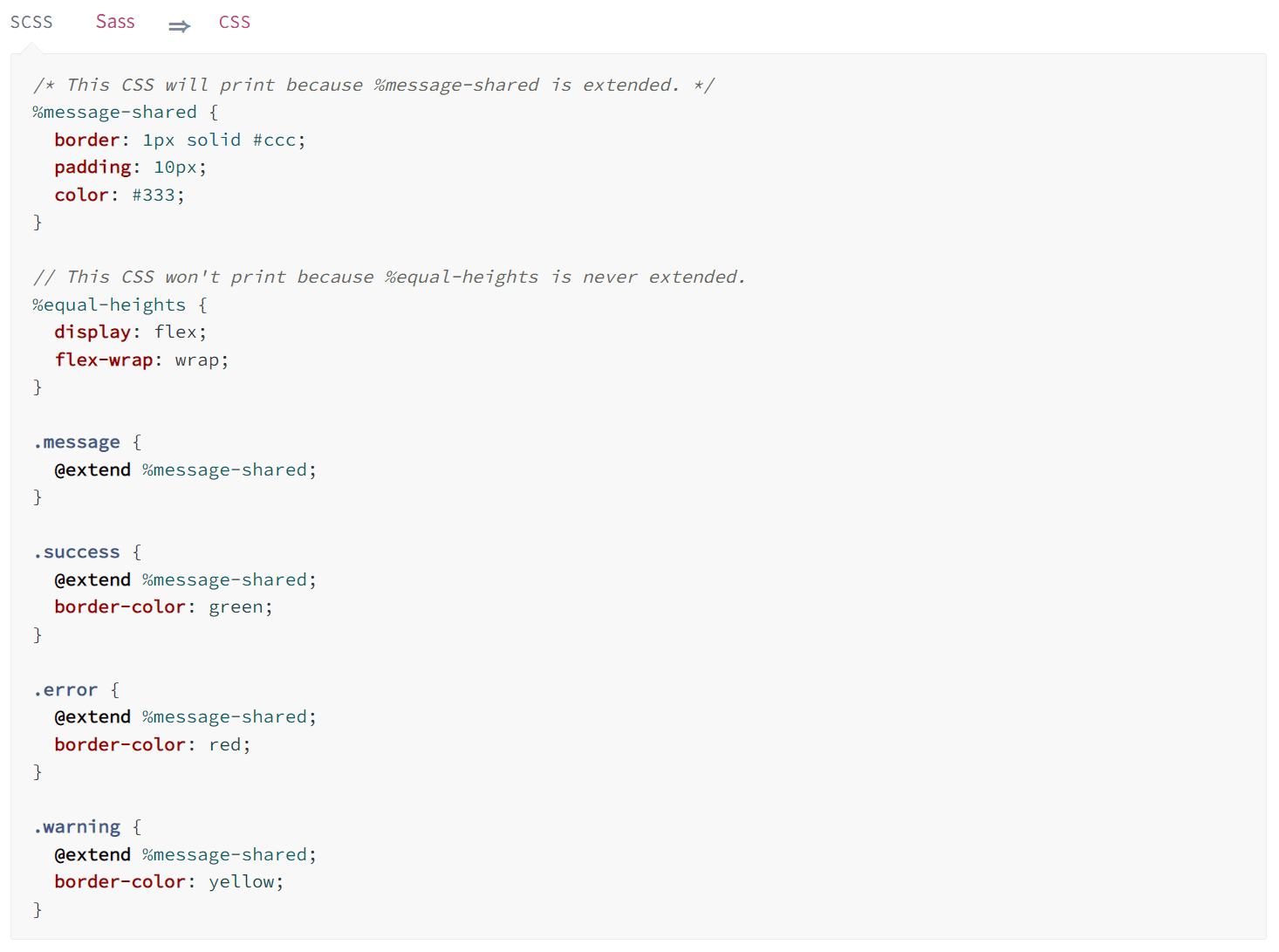
@extend를 사용하여 css 덩어리를 재사용할 수 있다. %로 정의된 클래스는 placeholder class라 불리며, @extend로 상속하기 이전까지는 css 스타일 적용이 유보된다. 즉, placeholder class를 정의해놓고 @extend 키워드를 통해 선택적으로 css 스타일을 적용할 수 있다.
Extend(상속)과 mixin의 차이
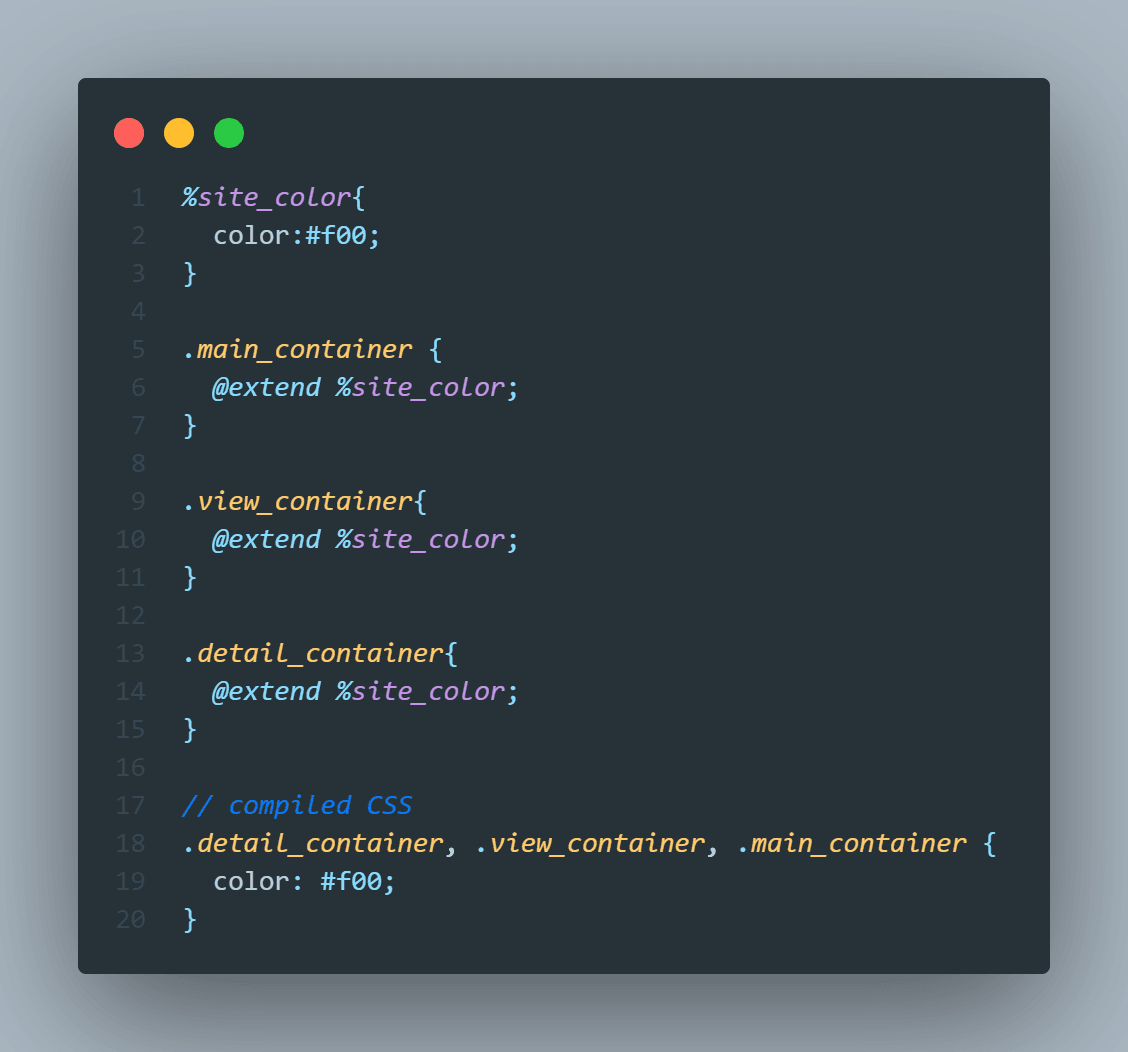
Mixin은 소스코드의 중복을 막기 위해서 사용된다면, extend(상속)는 연관성있는 규칙을 만들기 위해 사용한다. 이 둘의 차이는 css로 컴파일 되었을 때 속성들이 한 곳에 묶이느냐 안 묶이느냐에 차이가 있다.
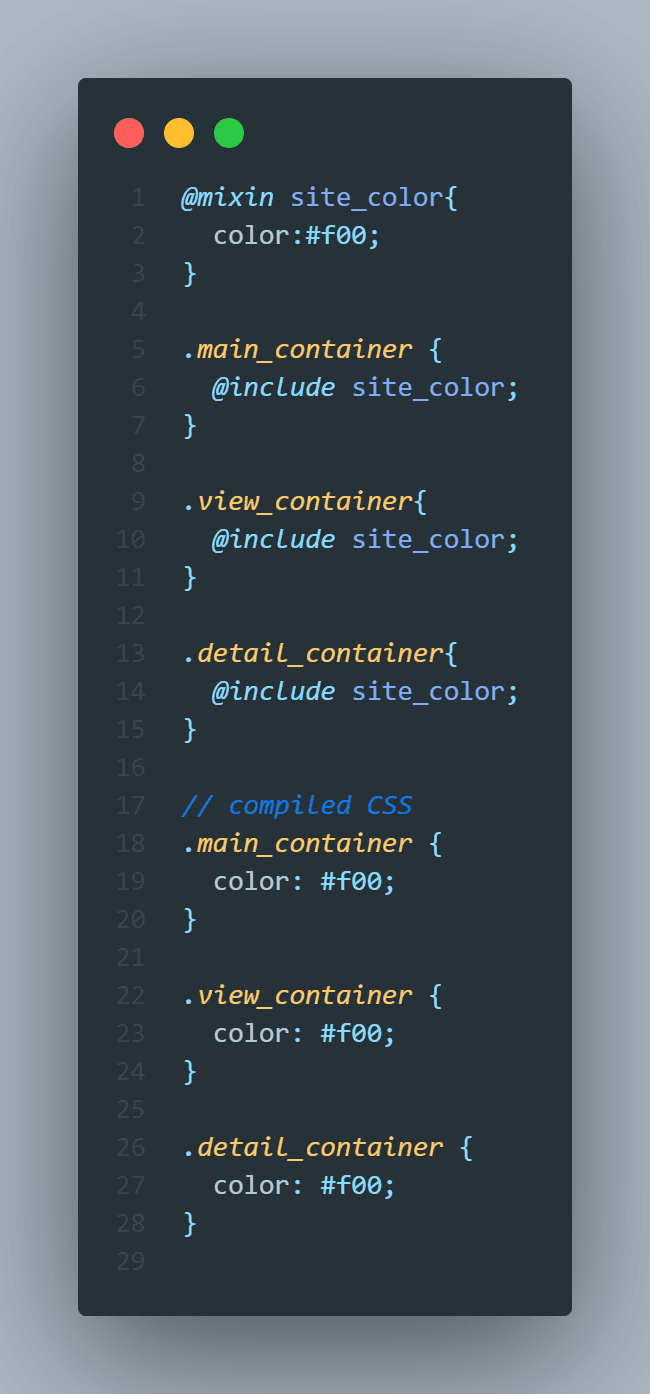
아래 코드를 보면 서로 연관성이 없는 세 개의 클래스 .main_container, .view_container, .detail_container에 코드를 재사용할 목적으로 @extend를 활용한 모습이다. 이럴때는 @mixin을 사용하는 것이 맞다. css로 변환된 @extend(상속) 문법의 코드를 보면 마치 연관성이 있는 것 마냥 묶이기 때문이다.
아래는 @mixin을 적용해본 모습이다. 세 개의 연관성 없는 콘테이너는 아래와 같이 따로 작성되는 것이 맞다. 연관성은 없지만 코드의 재사용을 피하고 싶을 때 mixin을 활용한다. 연관성 있는 것들을 묶을 때(재사용도 줄이면서) extend를 활용한다.
Operators
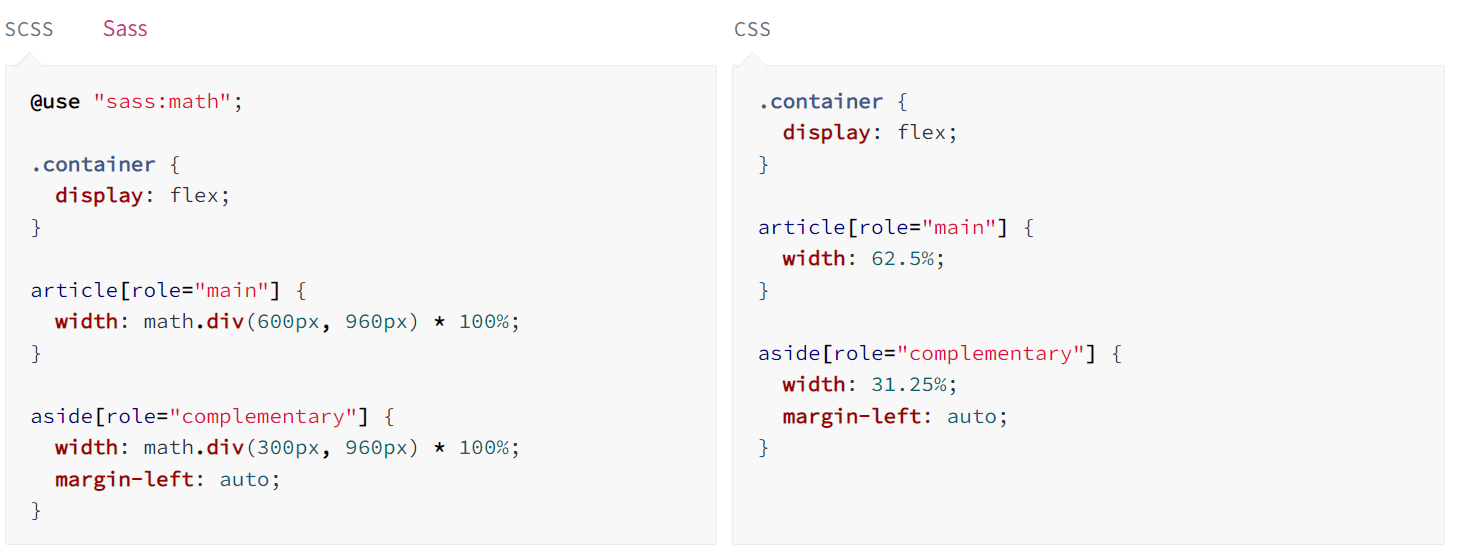
Sass는 +, -, *, math.div(), %와 같은 수학 연산들을 적용할 수 있다.
Sass + BEM
Sass(2006)는 BEM(2013) 이전에 탄생했다. 따라서 Sass의 Nesting 문법을 남용하면 Specificity(명시도) 관리에 애를 먹게 되는데, Sass의 편리한 문법은 취하면서도 BEM을 준수하여 Specificity를 준수할 필요가 있다.
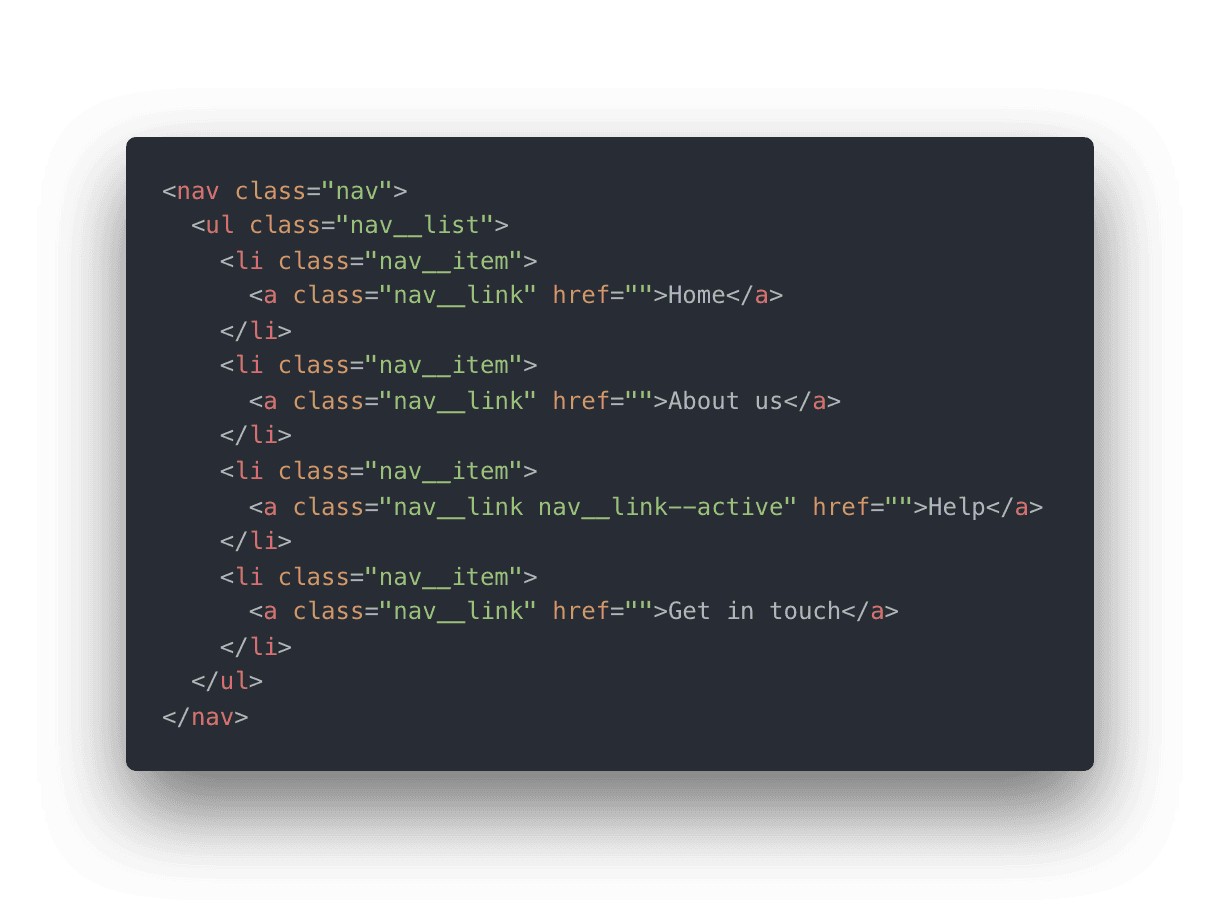
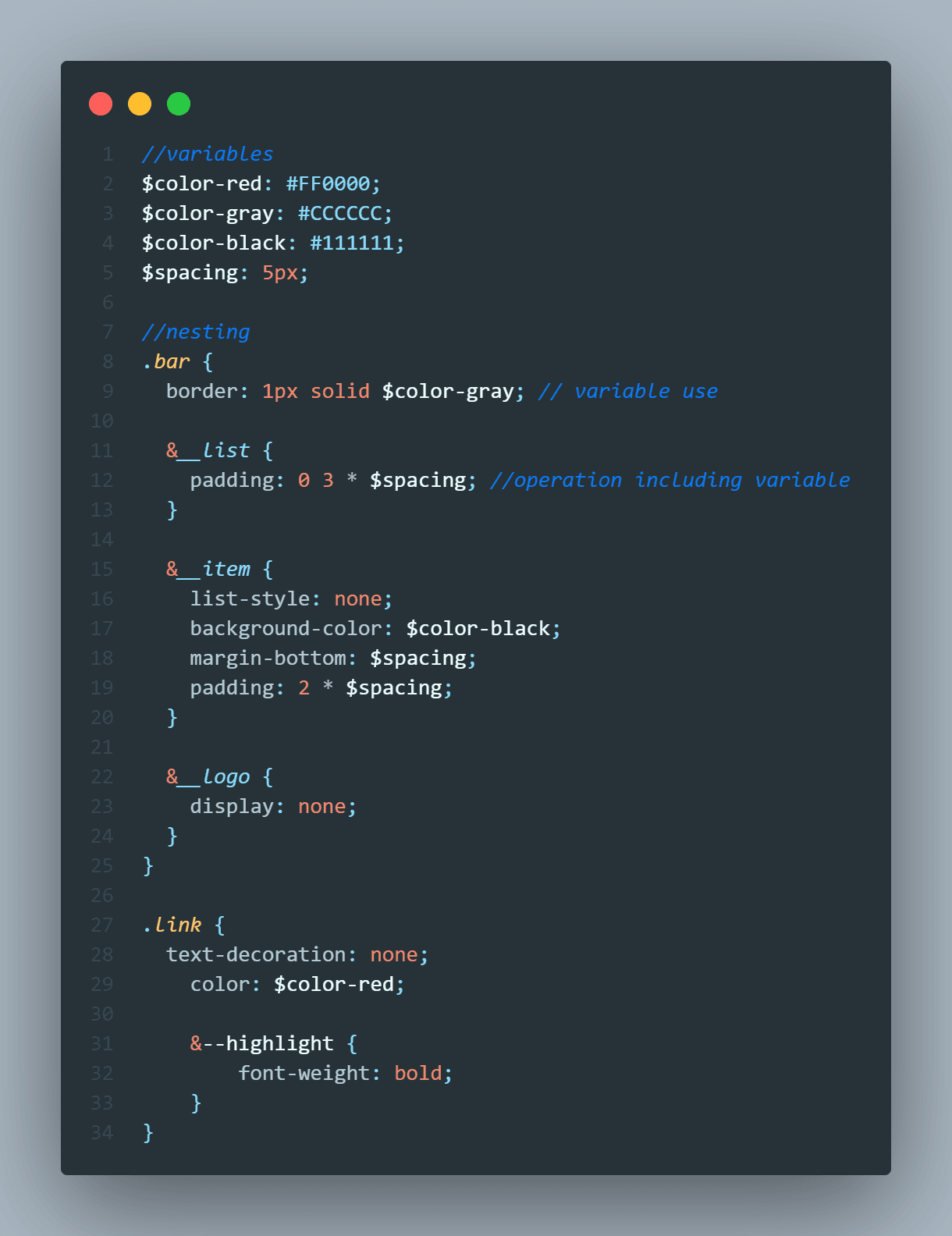
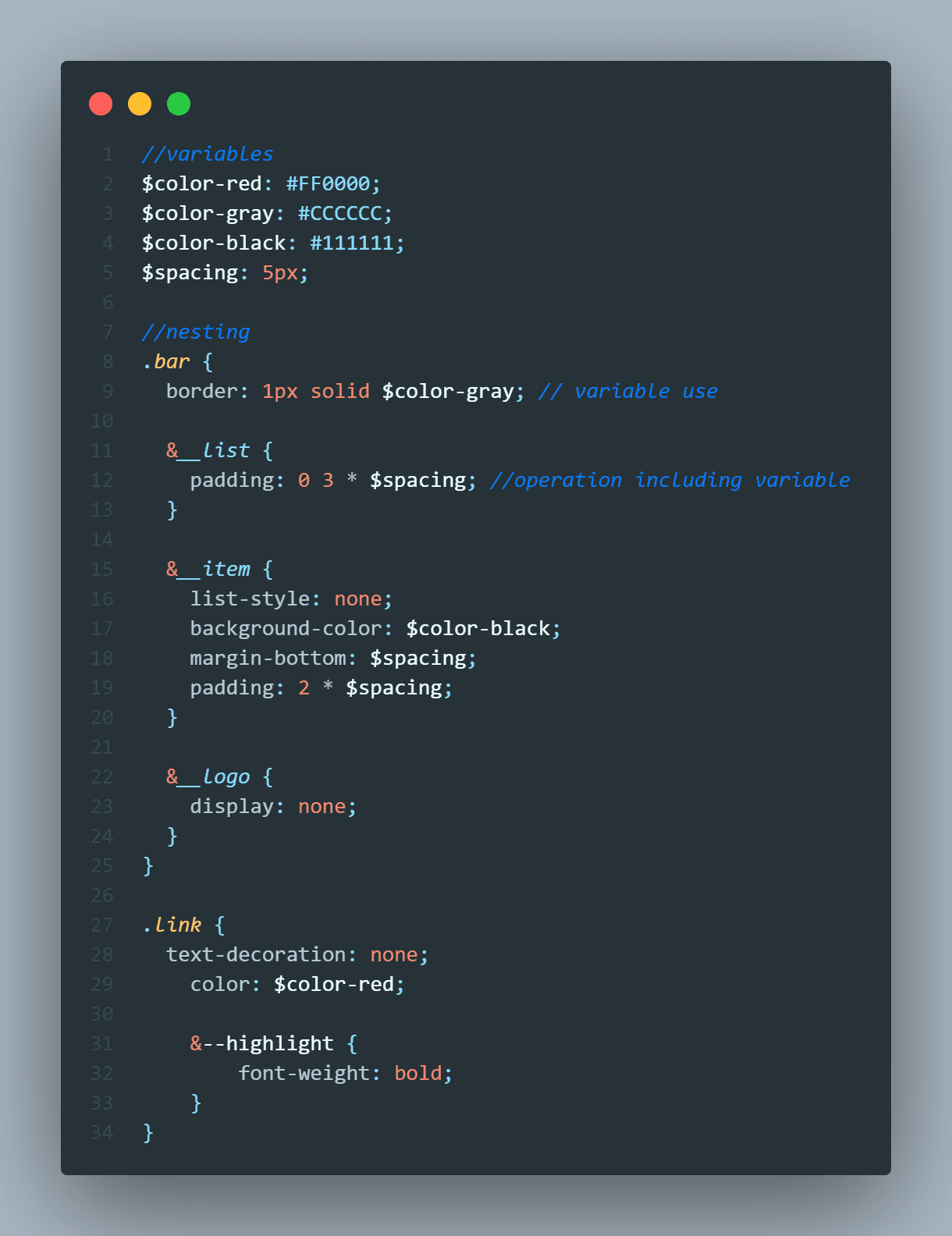
What we’ve done here is call out the .nav as the Block. Anything with double underscores __ are our Elements within that Block. And anything with double dash -- are our Modifiers.
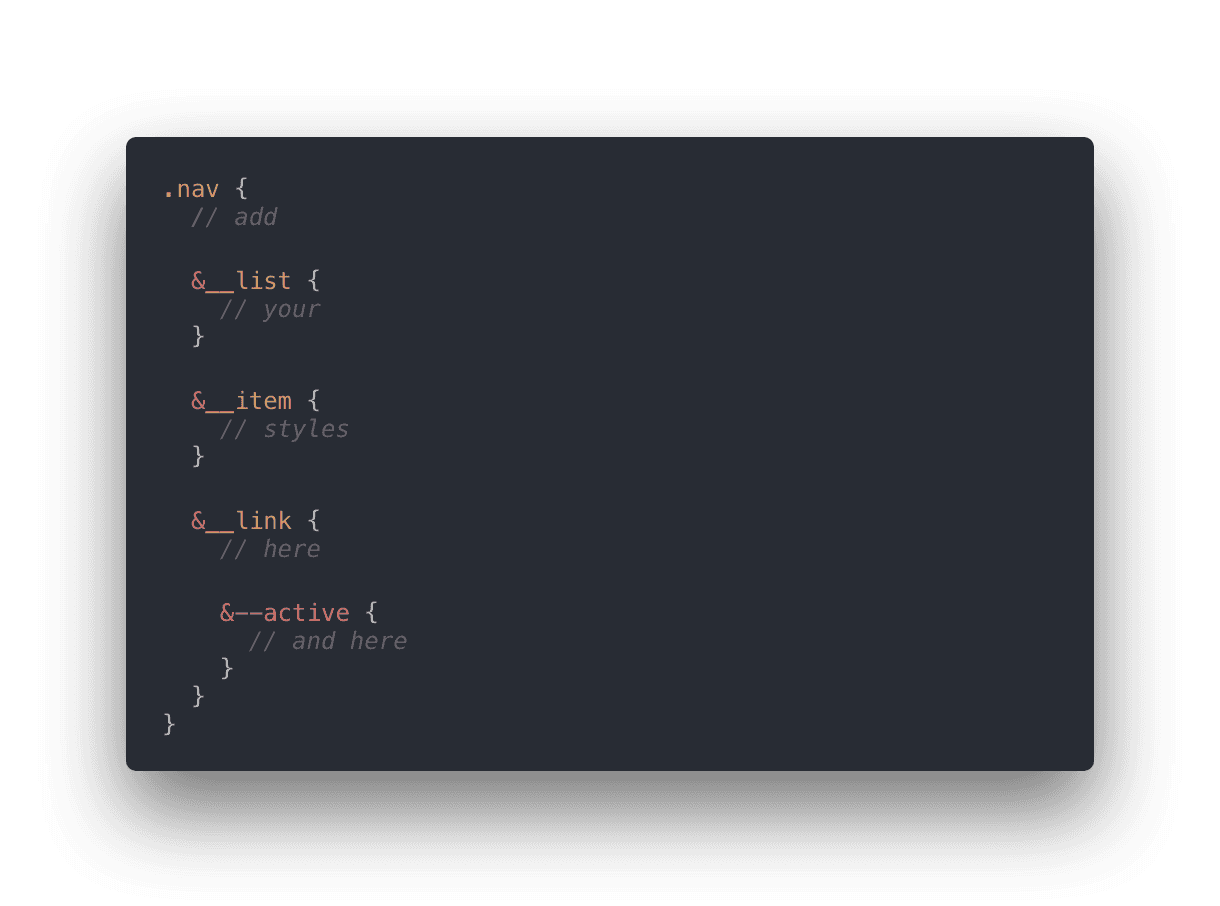
The & essentially saves us rewriting the parent selector over and over.
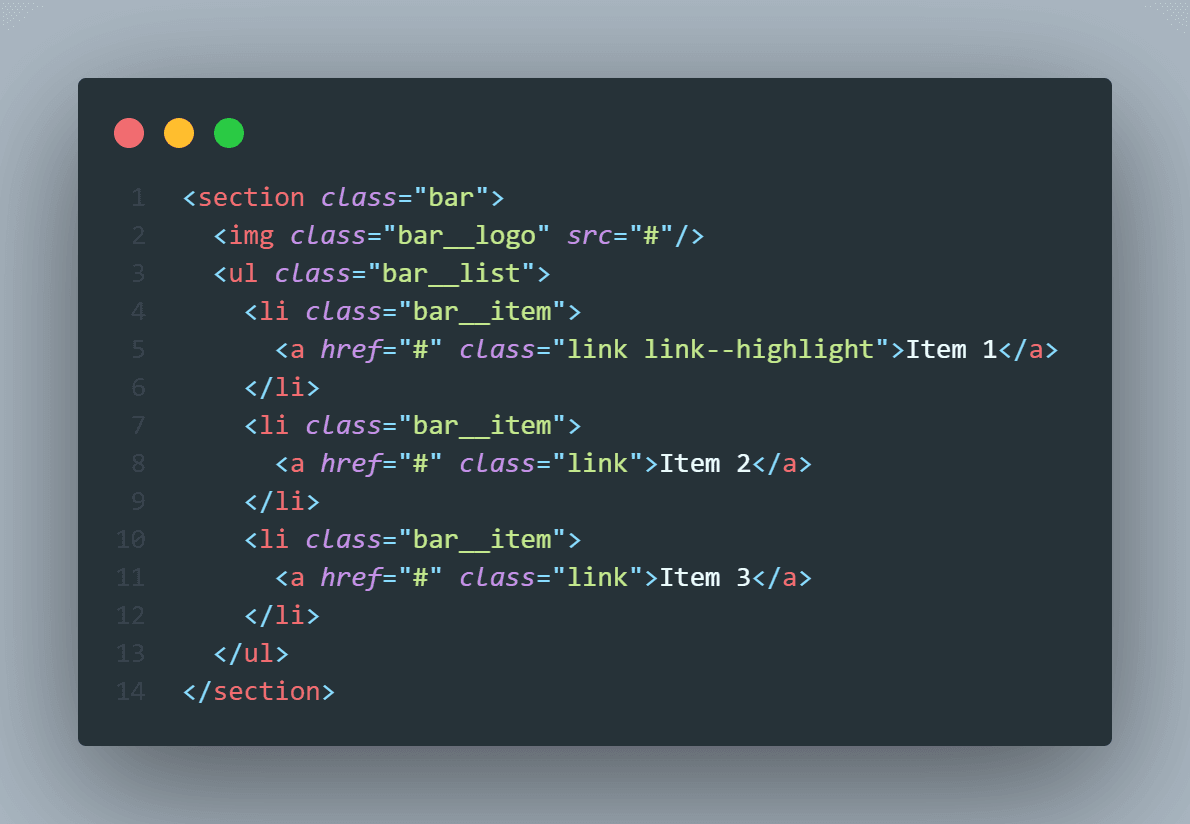
Here we have a block called "bar". It contains an image “bar__logo” and a list “bar__list” of links “bar__item” and “link” (which is another small block used throughout the project). For one of the links, we also have a modifier, "--highlight", which points out that our link will look different from the others. That’s it!
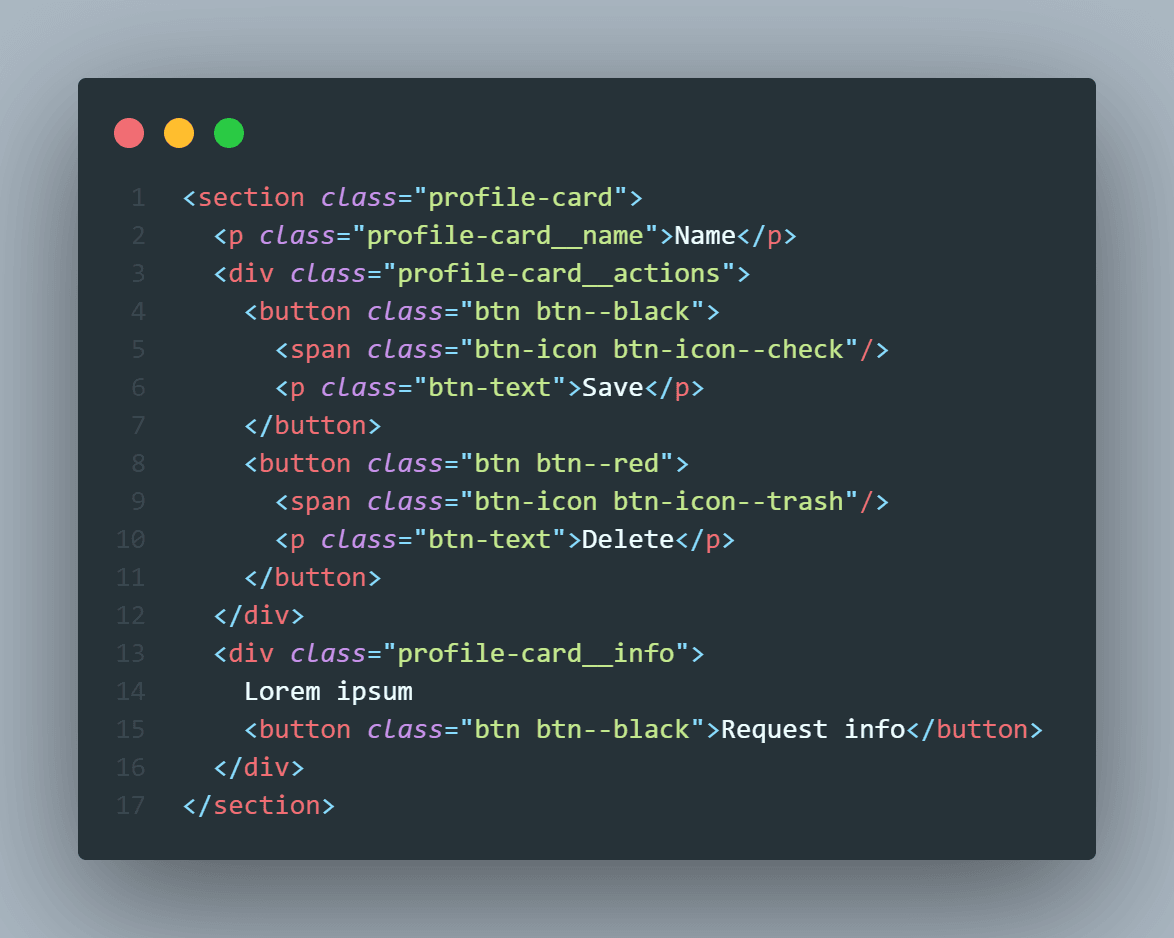
exam 3)
Sass 7-1 Architecture
7-1 패턴은 7개의 폴더와 1개의 파일로 이루어진 구조를 뜻한다.
sass/
|
|– abstracts/
|   // abstract 폴더의 style들은 CSS로 컴파일되지 않고,
|   // 다른 폴더를 돕는 helper다.
|   // 추후 프로젝트에 변경사항이 있을 때 abstract 폴더의 값만을 수정하여 관리할 수 있다.
|   |– _variables.scss    # Sass Variables
|   |– _functions.scss    # Sass Functions
|   |– _mixins.scss       # Sass Mixins + media query
|   |– _placeholders.scss # Sass Placeholders
|
|– base/
|	// 프로젝트를 위한 boilerplate code가 담긴 폴더
|	|- _base.scss         # initialize styles
|   |– _reset.scss        # Reset/normalize
|   |– _typography.scss   # Typography rules
|   …                     # Etc.
|
|– components/
|   // Components are a set of codes which has their character.
|   // It might be just one HTML element or a block of HTML elements.
|   |– _buttons.scss      # Buttons
|   |– _carousel.scss     # Carousel
|   |– _cover.scss        # Cover
|   |– _dropdown.scss     # Dropdown
|   …                     # Etc.
|
|– layout/
|	// 웹사이트 레이아웃에 관련된 파일들이 담긴 폴더
|   |– _navigation.scss   # Navigation
|   |– _grid.scss         # Grid system
|   |– _header.scss       # Header
|   |– _footer.scss       # Footer
|   |– _sidebar.scss      # Sidebar
|   |– _forms.scss        # Forms
|   …                     # Etc.
|
|– pages/
|   // 해당 페이지를 대상으로한 style.
|   // e-commerce project에 주로 쓰임. _login.scss _signup.scss
|   |– _home.scss         # Home specific styles
|   |– _contact.scss      # Contact specific styles
|   …                     # Etc.
|
|– themes/
|   // Themes folder is related to an overview of the project look. (e.g. dark mode)
|   |– _theme.scss        # Default theme
|   |– _admin.scss        # Admin theme
|   …                     # Etc.
|
|– vendors/
|	// All the external styles or 3rd party styles are placed in the Vendor folder.
|   |– _bootstrap.scss    # Bootstrap
|   |– _jquery-ui.scss    # jQuery UI
|   …                     # Etc.
|
`– main.scss              # Main Sass file