
Redux(3) - 미들웨어 redux-thunk
본 게시글은 책 <리액트를 다루는 기술 개정판> 18장 '리덕스 미들웨어를 통한 비동기 작업 관리'를 정리한 내용입니다
1. 미들웨어란?
미들웨어란 리듀서가 액션을 처리하기 전에 실행되는 함수다. 리덕스 사용 시 특별히 미들웨어를 설정하지 않았다면 dispatch된 액션은 곧바로 리듀서로 보내진다. 하지만 미들웨어를 설정한 경우 미들웨어는 액션과 리듀서 사이에서 중간자 역할을 한다. 미들웨어는 상탯값 변경 시 로그를 출력하는(redux-logger) 등 디버깅 목적으로 활용되거나, 비동기 작업을 처리하기 위해 사용된다.
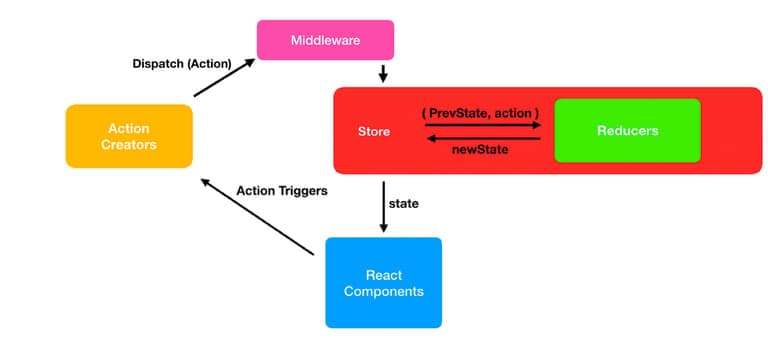
미들웨어의 기본 구조는 다음과 같다.
// 화살표 함수 작성시
const loggerMiddleware = store => next => action =>{

}

// 위와 동일한 함수 구조
const loggerMiddleware = function loggerMiddleware(store){
    return function(next){
        return function(action){
            // 미들웨어 기본 구조
        }
    }
}
미들웨어는 결국 함수를 반환하는 함수를 반환하는 함수다.
파라미터로 받아온 store는 리덕스 스토어 인스턴스를, action은 디스패치된 액션을 가리킨다.
next 파라미터는 dispatch와 비슷한 역할의 함수인데, next(action)을 호출하면 다음으로 처리해야 할 미들웨어에게 액션을 넘겨준다. 만약 그다음 미들웨어가 존재하지 않으면 최종적으로 리듀서에게 액션을 넘겨준다.
리덕스에 미들웨어를 적용하는 예시를 살펴보자.
import { createStore, applayMiddleware } from 'redux';

// 미들웨어1 정의
const middleware1 = store => next => action => { // 1
    console.log('middleware1 start');
    const result = next(action);
    console.log('middleware1 end');
    return result;
};
// 미들웨어2 정의
const middleware2 = store => next => action => {
    console.log('middleware2 start');
    const result = next(action);
    console.log('middleware2 end');
    return result;
};
// 아무일도 하지 않는 리듀서 정의
const myReducer = (state, action) => {
    console.log('myReducer)';
    return state;
};

const store = createStore(myReducer, applyMiddleware(middleware1, middleware2));
store.dispatch({ type: 'someAction' });
스토어를 생성할 때 applyMiddleware 함수의 파라미터로 앞서 정의한 미들웨어들을 전달함으로써 리덕스에 미들웨어를 적용할 수 있다. dispatch(action) 명령어를 통한 실행 결과는 아래와 같다.
middleware1 start
middleware2 start
myReducer
middleware2 end
middlware1 end
액션과 스토어 중간에 위치한 미들웨어가 dispatch된 액션을 캐치하였다. middleware1의 next 함수는 middleware2를 호출하고, middleware2의 next는 그 다음 호출할 미들웨어가 존재하지 않으므로 리듀서를 호출하게 된다. 이처럼 미들웨어는 리듀서 호출 전후에 필요한 작업을 정의할 수 있다. 액션 정보를 가로채서 변경한 후 리듀서에게 전달하거나, 특정 조건의 액션을 무시하게 할 수도 있다.
미들웨어는 위와 같이 직접 정의해서 사용하는 방법과 널리 쓰이는 미들웨어 패키지를 가져와 사용하는 방법이 있다. redux-thunk와 redux-saga는 미들웨어 패키지 중 가장 많이 사용되는 패키지여서 공부해둘 필요가 있다.
| 패키지명 | 선택 기준 | 특징 |
|---|---|---|
redxu-thunk | 비동기 코드의 로직이 간단할 때. | 가장 많이 사용하는 미들웨어이고 간단하게 시작할 수 있다. |
redux-saga | 복잡한 비동기 로직을 구현해야 할 때. | 제네레이터를 적극 활용한다. |
redux-saga는 다음 게시글에서 다뤄보도록 한다.
2. redux-thunk 사용해보기 (기본)
1) Thunk란?
Thunk는 특정 작업을 나중에 할 수 있도록 미루기 위해 함수 형태로 감싼 것을 의미한다.
컴퓨터 프로그래밍에서, 썽크(Thunk)는 기존의 서브루틴에 추가적인 연산을 삽입할 때 사용되는 서브루틴이다. 썽크는 주로 연산 결과가 필요할 때까지 연산을 지연시키는 용도로 사용되거나, 기존의 다른 서브루틴들의 시작과 끝 부분에 연산을 추가시키는 용도로 사용되는데...
썽크(Thunk)는 "고려하다"라는 영어 단어인 "Think"의 은어 격 과거분사인 "Thunk"에서 파생된 단어인데, 연산이 철저하게 "고려된 후", 즉 실행이 된 후에야 썽크의 값이 가용해지는 데서 유래된 것이라고 볼 수 있다. (위키백과)
예를 들어 주어진 파라미터에 1을 더하는 함수를 만들고 싶다면, 아래와 같이 작성할 것이다.
const addOne = x => x + 1;
addOne(1); // 2
addOne을 호출했을 때 바로 1+1이 연산되는 것을 볼 수 있다. 그런데 이 연산 작업을 나중으로 미루고(thunk) 싶다면?
const addOne = x => x + 1;
function addOneThunk(x) {
    const thunk = () => addOne(x);
    return thunk;
}

const fn = addOneThunk(1);
setTimeout(() => {
    const value = fn(); // fn이 실행되는 시점에 연산
    console.log(value);
}, 1000);
1초가 지나면 fn() -> addOneThunk(1)의 return값인 thunk -> addOne(x)가 호출되는 구조다. 이를 화살표 함수로만 작성한다면 아래와 같다.
cont addOne = x => x + 1;
const addOneThunk = x => () => addOne(x);

const fn = addOneThunk(1);
setTimeout(() => {
    const value = fn(); // fn이 실행되는 시점에 연산
    console.log(value);
}, 1000);
redux-thunk 라이브러리를 사용하면 thunk 함수를 만들어서 디스패치할 수 있다. 그러면 리덕스 미들웨어가 그 함수를 전달받아 store의 dispatch와 getState를 파라미터로 넣어서 호출해준다.
다음은 redux-thunk에서 사용할 수 있는 예시 thunk 함수다.
const sampleThunk = () => (dispatch, getState) => {
    // 현재 상태를 참조할 수 있고
    // 새 액션을 디스패치할 수도 있다.
}
2) 미들웨어 적용하기
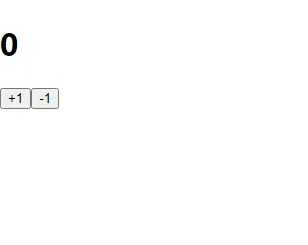
이전 글에서 만든 counter 관련 코드에 미들웨어를 적용해보자.
yarn add redux-thunk// index.js
import React from 'react';
import ReactDOM from 'react-dom';
import { createStore, applyMiddleware } from 'redux';
import { Provider } from 'react-redux';
import './index.css';
import App from './App';
import rootReducer from './modules';
import ReduxThunk from 'redux-thunk';
const store = createStore(rootReducer, applyMiddleware(logger, ReduxThunk));
ReactDOM.render(
<Provider store ={store}>
<App />
</Provider>,
document.getElementById('root')
);
앞서 잠깐 언급한대로 createStore 함수 안에 미들웨어를 파라미터로 전달받는 applyMiddleware 함수를 넣어준다. redux-thunk 미들웨어를 사용하기 때문에 ReduxThunk를 전달하였다.
3) Thunk 생성 함수 만들기
redux-thunk는 액션 생성 함수에서 일반 액션 객체를 반환하는 대신에 함수를 반환한다. 카운터 값을 비동기적으로 변경시키는 Thunk 생성 함수를 만들어보자.
// modules/counter.js

import { createAction, handleActions } from 'redux-actions';

const INCREASE = 'counter/INCREASE';
const DECREASE = 'counter/DECREASE';

export const increase = createAction(INCREASE);
export const decrease = createAction(DECREASE);

// 1초 뒤에 increase 혹은 decrease 함수를 디스패치함
export const increaseAsync = () => dispatch => {
    setTimeout(() => {
        dispatch(increase());
    }, 1000);
};
export const decreaseAsync = () => dispatch => {
    setTimeout(() => {
        dispatch(decrease());
    }, 1000);
};

const initialState = 0;

const counter = handleActions(
    {
        [INCREASE]: state => state +1,
        [DECREASE]: state => state -1
    },
    initialState
);

export default counter;
Thunk 생성 함수를 아래와 같이 CounterContainer 컴포넌트에 적용한다. 그러면 카운터의 +1, -1 버튼을 눌렀을 때 1초 뒤에 적용되는 것을 볼 수 있다.
// container/CounterContainer.js
import React from 'react';
import { connect } from 'react-redux';
import { increaseAsync, decreaseAsync } from '../modules/counter';
import Counter from '../components/Counter';

const CounterContainer = ({ number, increaseAsync, decreaseAsync}) => {
    return (
        <div>
            <Counter number={number}
            onIncrease={increaseAsync}
            onDecrease={decreaseAsync} />
        </div>
    );
};

export default connect(
    state => ({
        number: state.counter
    }),
    {
        increaseAsync,
        decreaseAsync
    }
)(CounterContainer);
3. redux-thunk 사용해보기 (응용)
1) API 호출 함수 작성하기
이번에는 thunk의 속성을 활용하여 웹 요청 비동기 작업을 처리해본다. 웹 요청 연습을 위해 JSONPlaceholder 에서 제공하는 가짜 API를 사용한다.
-
포스트 읽기( id는 1~100 사이 숫자)
GET https://jsonplaceholder.typicode.com/posts/:id -
모든 사용자 정보 불러오기
GET https://jsonplaceholder.typicode.com/users
API 호출은 Promise 기반의 axios 라이브러리를 사용한다.
yarn add axios가독성을 높이고 유지보수의 편의성 증진을 위하여 API 호출 함수를 따로 작성한다.
// lib/api.js
import axios from 'axios';

export const getPost = id =>
    axios.get(`https://jsonplaceholder.typicode.com/posts/${id}`);

export const getUsers = id =>
    axios.get(`https://jsonplaceholder.typicode.com/users`);
2) 액션 타입, thunk 함수, 리듀서 만들기
이제 위 API를 사용하여 데이터를 받아와 상태를 관리할 sample이라는 리듀서를 생성해 보자.
// modules/sample.js
import { handleActions } from 'redux-actions';
import * as api from '../lib/api';

// 액션 타입을 선언한다.
// 한 요청당 세 개의 액션 타입을 지닌다.

const GET_POST = 'sample/GET_POST';
const GET_POST_SUCCESS = 'sample/GET_POST_SUCCESS';
const GET_POST_FAILURE = 'sample/GET_POST_FAILURE';

const GET_USERS = 'sample/GET_USERS';
const GET_USERS_SUCCESSS = 'sample/GET__USERS_SUCCESS';
const GET_USERS_FAILURE = 'sample/GET_USERS_FAILURE';

// thunk 함수를 생성한다.
// thunk 함수 내부에서는 시작할 때, 성공했을 때, 실패했을 때 다른 액션을 디스패치한다.
// 파라미터 id는 Container Component 에서 getPost 호출 시 전해진 것.
export const getPost = id => async dispatch => {
    dispatch({ type: GET_POST }); // 요청을 시작한 것을 알림.
    try{
        const response = await api.getPost(id);
        dispatch({
            type: GET_POST_SUCCESS,
            payload: response.data
        }); // 요청 성공
    } catch(e){
        dispatch({
            type: GET_POST_FAILURE,
            payload:e,
            error: true
        }); // 에러 발생
        throw e; // 나중에 컴포넌트단에서 에러를 조회할 수 있게 해 줌
    }
};

export const getUsers = () => async dispatch => {
    dispatch({ type: GET_USERS }); // 요청을 시작한 것을 알림
    try{
        const response = await api.getUsers();
        dispatch({
            type: GET_USERS_SUCCESS,
            payload: response.data
        }); // 요청 성공
    } catch(e){
        dispatch({
            type: GET_USERS_FAILURE,
            payload:e,
            error: true
        }); // 에러 발생
        throw e;
    }
};

const initialState = {
    loading: {
        GET_POST: false,
        GET_USERS: false
    },
    post: null,
    users: null
};

const sample = handleActions(
    {
        [GET_POST]: state => ({
            ...state,
            loading: {
                ...state.loading,
                GET_POST:true // 요청 시작
            }
        }),
        [GET_POST_SUCCESS]: (state, action) => ({
            ...state,
            loading: {
                ...state.loading,
                GET_POST: false // 요청 완료
            },
            post: action.payload
            // 상탯값 post에 GET_POST 요청으로 받아온 결과(payload)를 할당.
        }),
        [GET_POST_FAILURE]: (state, action) => ({
            ...state,
            loading: {
                ...state.loading,
                GET_POST: false // 요청 완료
            }
        }),
        [GET_USERS]: state => ({
            ...state,
            loading: {
                ...state.loading,
                GET_USERS: true // 요청 시작
            }
        }),
        [GET_USERS_SUCCESS]: (state, action) => ({
            ...state,
            loading: {
                ...state.loading,
                GET_USERS: false // 요청 완료
            },
            users:action.payload
            // 상탯값 usesr에 GET_USERS 요청으로 받아온 결과(payload)를 할당.
        }),
        [GET_USERS_FAILURE]: (state, action) => ({
            ...state,
            loading: {
                ...state.loading,
                GET_USERS: false // 요청 완료
            }
        })
    },
    initialState
);
중복되는 로직은 나중에 리팩토링할 예정이다. sample 리듀서를 루트 리듀서에 포함시킨다.
// modules/index.js
import { combineReducers } from 'redux';
import counter from './counter';
import sample from './sample';

const rootReducer = combineReducers({
    counter, // 사용하지는 않음!
    sample
});

export default rootReducer;
3) UI (Presentational Componet) 만들기
이제 UI (Presentational Componet)와 Container Component를 만들어야 한다. UI는 API를 통해 받아온 데이터가 출력되는 화면이므로, 받아올 데이터의 형식을 봐둘 필요가 있다.
// post
{
  "userId": 1,
  "id": 1,
  "title": "sunt aut facere repellat provident occaecati excepturi optio reprehenderit",
  "body": "quia et suscipit\nsuscipit recusandae consequuntur expedita et cum\nreprehenderit molestiae ut ut quas totam\nnostrum rerum est autem sunt rem eveniet architecto"
}

// users
[
  {
    "id": 1,
    "name": "Leanne Graham",
    "username": "Bret",
    "email": "Sincere@april.biz",
    "address": {
      "street": "Kulas Light",
      "suite": "Apt. 556",
      "city": "Gwenborough",
      "zipcode": "92998-3874",
      "geo": {
        "lat": "-37.3159",
        "lng": "81.1496"
      }
    },
    "phone": "1-770-736-8031 x56442",
    "website": "hildegard.org",
    "company": {
      "name": "Romaguera-Crona",
      "catchPhrase": "Multi-layered client-server neural-net",
      "bs": "harness real-time e-markets"
    }
  }, (...)
]
화면에 출력할 내용은 post의 경우 title,body이고 users의 경우 username과 email이다.
// components/Sample.js
import React from 'react';

const Sample = ({ loadingPost, loadingUsers, post, users}) => {
    return (
        <div>
            <section>
                <h1>포스트</h1>
                {loadingPost && '로딩 중...'}
                {!loadingPost && post && (
                    <div>
                        <h3>{post.title}</h3>
                        <h3>{post.body}</h3>
                    </div>
                )}
            </section>
            <hr />
            <section>
                <h1>사용자 목록</h1>
                {loadingUsers && '로딩 중...'}
                {!loadingUsers && users && (
                    <ul>
                        {users.map(user => (
                            <li key={user.id}>
                                {user.username} ({user.email})
                            </li>
                        ))}
                    </ul>
                )}
            </section>
        </div>
    );
};

export default Sample;
데이터를 불러와서 렌더링해 줄 때는 유효성 검사를 해 주는 것이 중요하다. axios에 성공해서 post가 true일 때(post &&) post.title과 post.body를 보여주겠다는 것처럼 말이다. 만약 데이터가 없는데도 불구하고 post.title을 조회하려고 하면 에러가 발생하니 반드시 유효성 검사를 해줘야 한다.
4) Container Component 만들기
// containers/SampleContainer.js
import React, { useEffect } from 'react';
import {connect} from 'react-redux';
import Sample from '../components/Sample';
import { getPost, getUsers } from '../modules/sample';

const SampleContainer = ({
    getPost,
    getUsers,
    post,
    users,
    loadingPost,
    loadingUsers
}) => {
    useEffect(() => {
        getPost(1);
        getUsers();
    }, [getPost, getUsers]);

    return (
        <Sample
            post={post}
            users={users}
            loaidngPost={loadingPost}
            loadingUsers={loadingUsers}
        />
    );
};

export default connect(
    ({sample}) => ({
        post: sample.post,
        users: sample.users,
        loadingPost: sample.loading.GET_POST,
        loaidngUsers: sample.loading.GET_USERS
    }),
    {
        getPost,
        getUsers
    }
)(SampleContainer);
마지막으로 App 컴포넌트에서 SampleContainer 컴포넌트를 렌더링하게끔 해주면 완성이다.
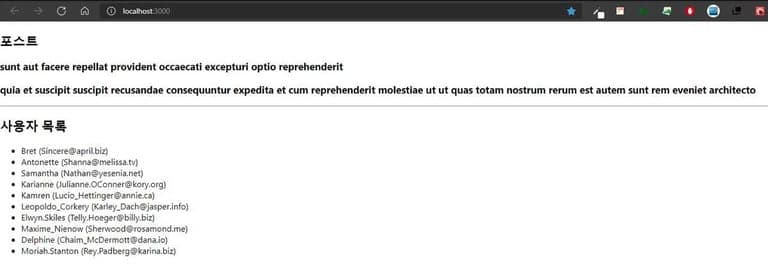
동작 과정을 정리해보자면 다음과 같다.
- Container Component에서 렌더링이 되자마자 useEffect에 의해
getPost,getUsersthunk 함수를 호출한다. (connect 함수로 store와 연결되어 있기 때문에 호출이 가능한 것.) - getPost 함수가 실행되면 API 요청이 시작했음을 알리는
GET_POST액션을 먼저 dispatch한다. - 리듀서에 정의된
GET_POST액션의 동작은 loading state를 true로 변경하는 것이다. - 이후 비동기 API 함수 처리 과정이 진행된다. 처리가 끝나면, 성공/실패 여부에 따라
GET_POST_SUCCESS액션 혹은GET_POST_FAILURE액션을 dispatch한다. GET_POST와 마찬가지로 리듀서에 정의된대로 상태 변화를 수행. getUsersthunk 함수 또한 이와 같은 방식으로, 거의 동시적으로 수행된다.
5) 리팩토링
thunk 함수의 코드가 너무 길고 로딩 상태를 리듀서에서 관리하는 작업은 귀찮다. 반복되는 로직을 따로 분리하여 코드를 줄여보도록 하자.
// lib/createRequestThunk.js
export default function createRequestThunk(type, request){
    // 성공 및 실패 액션 타입을 정의
    const SUCCESS = `${type}_SUCCESS`;
    const FAILURE = `${type}_FAILURE`;

    // params는 SampleContainer에서 getPost()호출 시 파라미터로 전달한 값을 받는다.
    return params => async dispatch =>{
        dispatch({type}); // API 요청이 시작됨
        try{
            const response = await request(params);
            dispatch({
                type:SUCCESS,
                payload:response.data
            }); // API 요청에 성공
        } catch(e){
            dispatch({
                type: FAILURE,
                payload:e,
                error:true
            }); // API 요청 중 에러 발생
            throw e;
        }
    };
}

// 사용법: createRequestThunk('GET_USERS', api.getUsers);
유틸 함수 createRequestThunk는 API 요청을 해 주는 thunk 함수를 한 줄로 생성할 수 있게 해준다. 액션 타입과 API를 요청하는 함수를 파라미터로 넣어 주면 나머지 작업을 대신 처리한다. 이 함수를 사용하여 기존 thunk 함수의 코드를 대체해보자.
// modules/sample.js
import { handleActions } from 'redux-actions';
import * as api from '../lib/api';
import createRequestThunk from '../lib/createRequestThunk';

const GET_POST = 'sample/GET_POST';
const GET_POST_SUCCESS = 'sample/GET_POST_SUCCESS';
const GET_POST_FAILURE = 'sample/GET_POST_FAILURE';

const GET_USERS = 'sample/GET_USERS';
const GET_USERS_SUCCESSS = 'sample/GET__USERS_SUCCESS';
const GET_USERS_FAILURE = 'sample/GET_USERS_FAILURE';

export const getUsers = createRequestThunk(GET_USERS, api.getUsers);
export const getPost = createRequestThunk(GET_POST, api.getPost);
// export const getPost = id => async dispatch => {
//     dispatch({ type: GET_POST }); // 요청을 시작한 것을 알림.
//     try{
//         const response = await api.getPost(id);
//         dispatch({
//             type: GET_POST_SUCCESS,
//             payload: response.data
//         }); // 요청 성공
//     } catch(e){
//         dispatch({
//             type: GET_POST_FAILURE,
//             payload:e,
//             error: true
//         }); // 에러 발생
//         throw e; // 나중에 컴포넌트단에서 에러를 조회할 수 있게 해 줌
//     }
// };

const initialState = {
    (...)
};

const sample = handleActions(
    (...)
);
이번에는 요청의 로딩 상태 관리를 개선하자. 기존에는 리듀서 내부에서 각 요청에 관련된 액션이 디스패치될 때마다 로딩 상태를 변경해주었다. 이 작업을 로딩 상태만 관리하는 리덕스 모듈을 따로 생성하여 처리하자.
// modules/loading.js
import { createAction, handleActions } from 'redux-actions';

const START_LOADING = 'loading/START_LOADING';
const FINISH_LOADING = 'loading/FINISH_LOADING';

// 요청을 위한 액션 타입을 payload로 설정한다. ex) sample/GET_POST
export const startLoading = createAction(
    START_LOADING,
    requestType => requestType
);

export const finishLoading = createAction(
    FINISH_LOADING,
    requestType => requestType
);

const initialState = {};

const loading = handleActions(
    {
        [START_LOADING]: (state, action) => ({
            ...state,
            [action.payload]: true
        }),
        [FINISH_LOADING]: (state, action) => ({
            ...state,
            [action.payload]: false
        })
    },
    initialState
);

export default loading;
로딩 상태 관리를 위한 액션 타입, 액션 생성자, 리듀서를 만들었다. loading 리듀서 또한 ./index.js에서 루트 리듀서에 포함시킨다.
loading 리덕스 모듈에서 만든 액션 생성 함수는 createRequestThunk에서 사용한다.
// lib/createRequestThunk.js
import { startLoading, finishLoading } from '../modules/loading';

export default function createRequestThunk(type, request){
    // 성공 및 실패 액션 타입을 정의
    const SUCCESS = `${type}_SUCCESS`;
    const FAILURE = `${type}_FAILURE`;

    // params는 SampleContainer에서 getPost()호출 시 파라미터로 전달한 값을 받는다.
    return params => async dispatch =>{
        dispatch({type}); // API 요청이 시작됨
        dispatch(startLoading(type)); // 로딩중으로 상태 변경
        try{
            const response = await request(params);
            dispatch({
                type:SUCCESS,
                payload:response.data
            }); // API 요청에 성공
            dispatch(finishLoading(type)); // 로딩 끝
        } catch(e){
            dispatch({
                type: FAILURE,
                payload:e,
                error:true
            }); // API 요청 중 에러 발생
            dispatch(startLoading(type));
            throw e;
        }
    };
}

// 사용법: createRequestThunk('GET_USERS', api.getUsers);
그러면 SampleContainer에서 로딩 상태를 다음과 같이 조회할 수 있다. 앞서 루트 리듀서에 포함시켜 store에 전해졌던 loading 모듈의 상태를 connect 함수를 통해 불러와 사용하는 것이다.
// containers/SampleContainer.js
import React, { useEffect } from 'react';
import {connect} from 'react-redux';
import Sample from '../components/Sample';
import { getPost, getUsers } from '../modules/sample';

const SampleContainer = ({
    getPost,
    getUsers,
    post,
    users,
    loadingPost,
    loadingUsers
}) => {
    useEffect(() => {
        getPost(1);
        getUsers();
    }, [getPost, getUsers]);

    return (
        <Sample
            post={post}
            users={users}
            loaidngPost={loadingPost}
            loadingUsers={loadingUsers}
        />
    );
};

export default connect(
    ({sample, loading}) => ({
        post: sample.post,
        users: sample.users,
        loadingPost: loading['sample/GET_POST'],
        loadingUsers: loading['sample/GET_USERS]'
        // loadingPost: sample.loading.GET_POST,
        // loaidngUsers: sample.loading.GET_USERS
    }),
    {
        getPost,
        getUsers
    }
)(SampleContainer);
이제 sample 리듀서에서 불필요한 코드를 지우면 된다.
// modules/sample.js
import { handleActions } from 'redux-actions';
import * as api from '../lib/api';
import createRequestThunk from '../lib/createRequestThunk';

const GET_POST = 'sample/GET_POST';
const GET_POST_SUCCESS = 'sample/GET_POST_SUCCESS';
// const GET_POST_FAILURE = 'sample/GET_POST_FAILURE';

const GET_USERS = 'sample/GET_USERS';
const GET_USERS_SUCCESS = 'sample/GET_USERS_SUCCESS';
// const GET_USERS_FAILURE = 'sample/GET_USERS_FAILURE';

export const getPost = createRequestThunk(GET_POST, api.getPost);
export const getUsers = createRequestThunk(GET_USERS, api.getUsers);

const initialState = {
    // loading : {
    //     GET_POST: false,
    //     GET_USERS: false
    // },
    // post: null,
    // users: null
    post:null,
    users:null
};

const sample = handleActions(
    {
        [GET_POST_SUCCESS]: (state,action) => ({
            ...state,
            post: action.payload
        }),
        [GET_USERS_SUCCESS]: (state,action) => ({
            ...state,
            users: action.payload
        })
        // [GET_POST_SUCCESS]: (state, action) => ({
        //     ...state,
        //     loading: {
        //         ...state.loading,
        //         GET_POST: false // 요청 완료
        //     },
        //     post: action.payload // 상탯값 post에 GET_POST 요청으로 받아온 결과(payload)를 할당.
        // }),
    },
    initialState
);

export default sample;
동작 과정을 정리해보면 다음과 같다.
-
SampleContainer에서 useEffect에 의해getPost,getUsersthunk 함수가 호출된다. -
modules/sample.js 에 정의된 getPost와 getUsers는
createRequsetThunk함수를 가리킨다. -
createRequestThunk함수는 API 요청을 위한 dispatch를 수행하면서, 로딩 상태 관리를 위한 dispatch도 수행한다. 리듀서는 이 액션을 받아 상태를 변화한 후 스토어에 저장한다. -
스토어에 저장된 상태를
SampleContainer에서 connect 함수를 통해 갱신해온다. loadingPost와 loadingUsers는 로딩 상태를 관리하기 위한 type 외에도 payload라는 별도의 값을 가져서 어떤 API 요청에 관한 로딩 상태인지를 표시한다. ex) {type: "loading/START_LOADING", payload: "sample/GET_POST"} -
상태를 UI에 출력한다.
References
- 리덕스 미들웨어는 무엇인가? (1)
- <리액트를 다루는 기술 개정판>(김민준, 2019)
- <리액트 실전 프로그래밍 개정판>(이재승, 2020)