
AWS EC2에 NGINX reverse-proxy 구축하기 ( https - http mixed content error 해결하기 )
·3 min to read
apt install nginxvim /etc/nginx/nginx.conf
Docker-compose에 NGINX 적용하기
React, Node, Flask 환경을 구동하는 세 개의 컨테이너를 하나로 묶은 Docker-compose가 있다. 여기에 NGINX를 도입해볼 것이다.
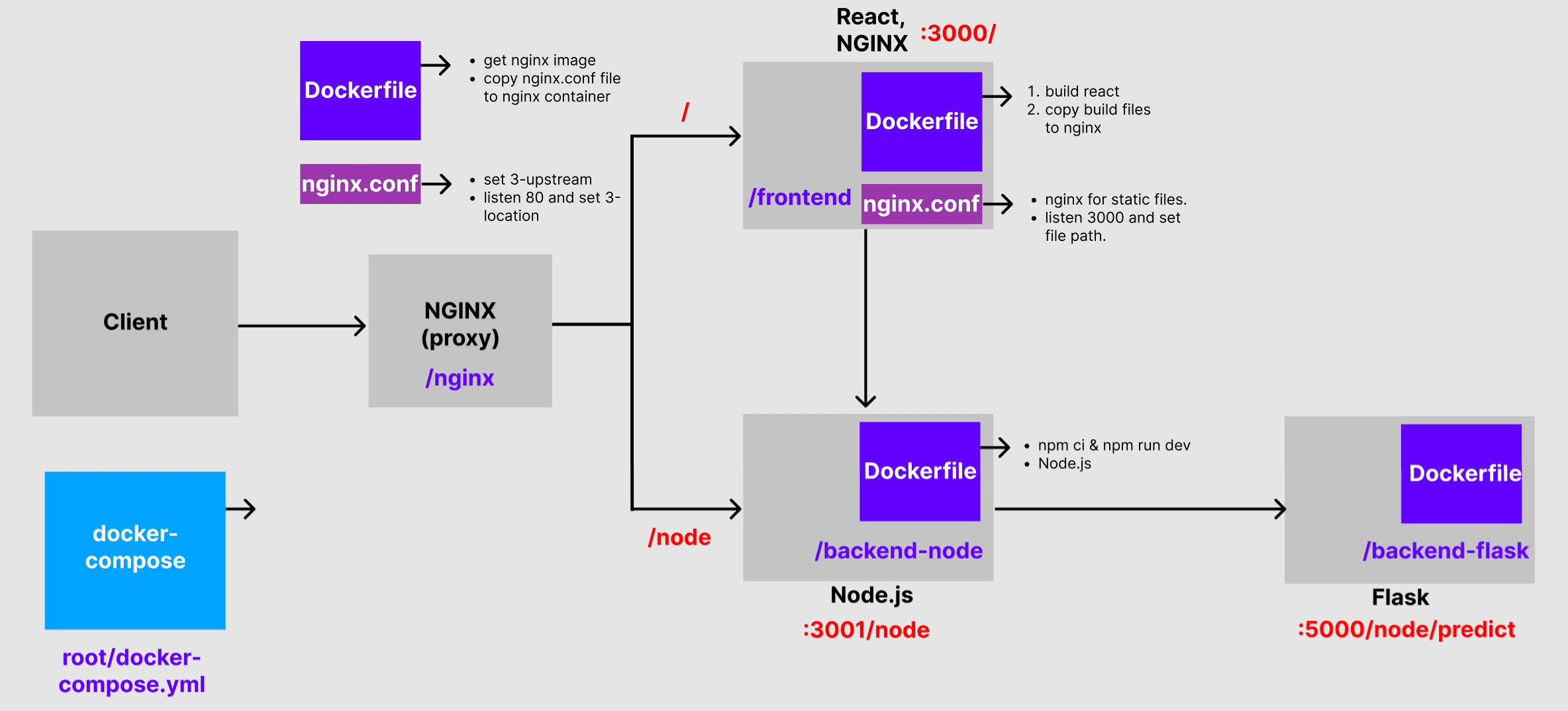
도커를 이용한 NGINX 설치 및 가동
docker pull nginx(NGINX 도커 이미지를 받는다)docker container run --name nginxServer -d -p 8080:80 nginx(NGINX는 80번 포트를 사용한다)docker build --tag nginx-test:1.0 .(도커 이미지 생성)docker run nginx-test:1.0
NGINX
nginx는 마스터 프로세스와 여러 개의 워커 프로세스로 구성된다. 마스터 프로세스는 configuration file을 읽어들여 워커 프로세스의 수를 조정하고 유지한다. 워커 프로세스는 실질적으로 요청을 수행하는 역할을 맡는다.
start, stop, and reload config
- start (run excutable file)
nginx -s start(signal) nginx -s stop/quit/reload/reopen(signal)
configuration file에 적용된 변화는 reload되어야만 nginx에 반영된다. 마스터 프로세스가 reload signal을 전달받으면, configuration file 내 변화된 문법을 체크하고 적용한다. 적용에 성공하면 새로운 워커 프로세스를 시작하고 이전의 워커 프로세스에는 메시지를 보내 shutting donw 시킨다.
configuration file
nginx는 config file에 지정된 지시문(Directives)에 의해 제어되는 모듈들로 구성된다. directives는 simple directives와 block directives로 나뉜다.
- simple directives :
name parameter;형식 - block directives :
http {} server{} location paramter {}
Serving Static Content
- server :
listen과server name으로 port를 구분한다.
http{
	server{
    }
}- location : server 내에 location 블락 지시문을 둔다. location에는
/prefix를 명시하여 request의 URI와 비교한다. 매칭되는 URI는 root에 명시된 경로를 형성한다?
location / {
	root /data/www;
}
Setting Up a Simple Proxy Server
- proxy_pass :
location블록에 protocol, name and port로 이루어진 proxied server를 명시한다. ex) http://localhost:8080; - server name :
server_namedirective로 정의되고, 주어진 요청에 사용되는 server block을 결정한다.
server {
    listen       80;
    server_name  example.org  www.example.org;
    ...
}

server {
    listen       80;
    server_name  *.example.org;
    ...
}

server {
    listen       80;
    server_name  mail.*;
    ...
}

server {
    listen       80;
    server_name  ~^(?<user>.+)\.example\.net$;
    ...
}- upstream :
proxy_pass를 통해 nginx가 받은 요청들을 넘겨 줄 서버를 정의하는 지시자.
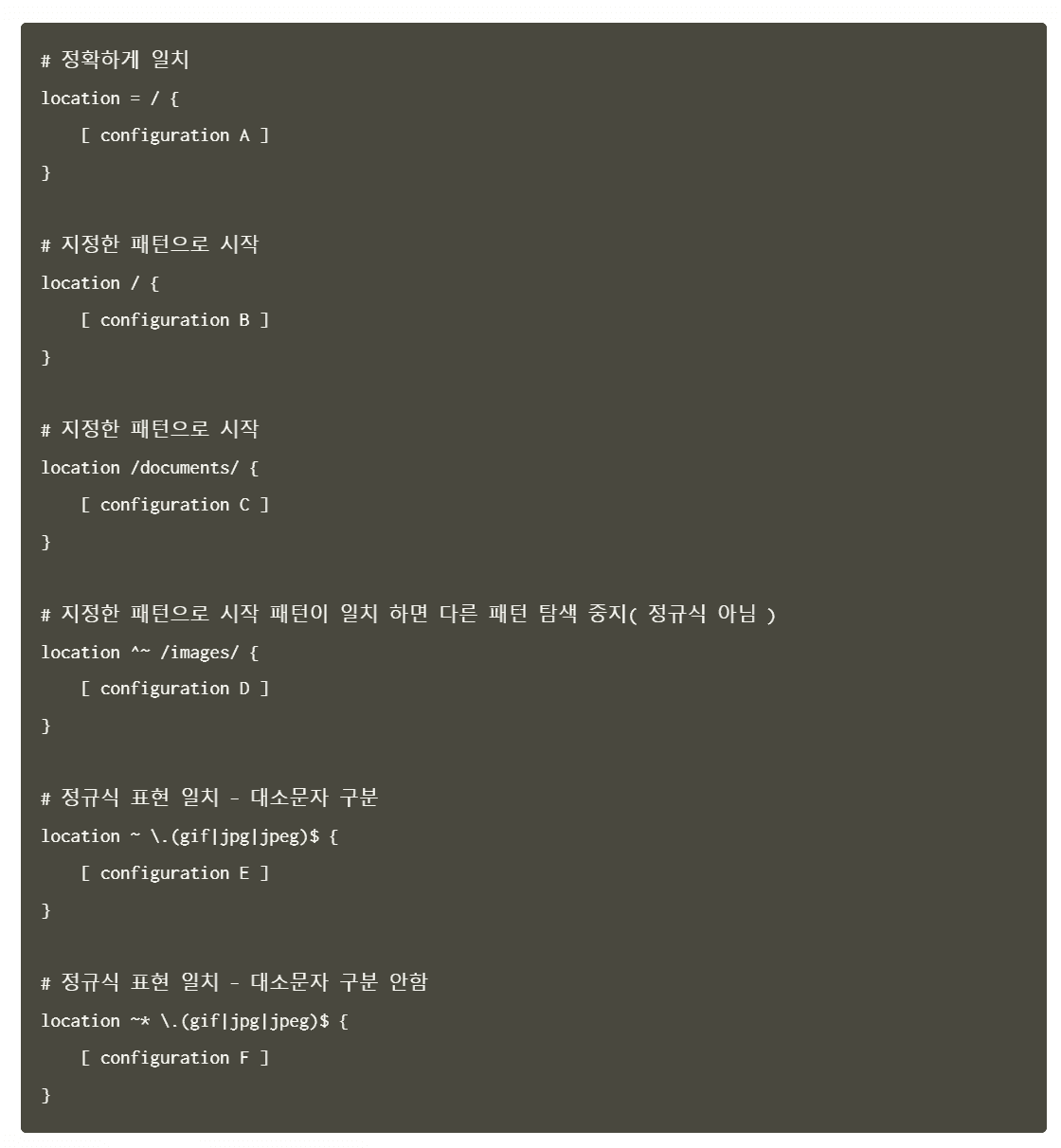
변수
<http://opentutorials.org:80/production/module/index.php?type=module&id=12>

$host : opentutorials.org
$uri : /production/module/index.php
$args : type=module&id=12
server_addr : 115.68.24.88
server_name : localhost
server_port : 80
server_protocol : HTTP/1.1
$arg_type : module
$request_uri : /production/module/index.php?type=module&id=12
$request_filename : /usr/local/nginx/html/production/module/index.php